Help
Taking part in an online auction
You join, add lots and bid until bidding ends at a set time. Then you pay the club, and everybody meets once to hand over bags.
There's no live session to watch. Every lot is up for the whole auction, and you can bid any time.
1. Join the auction
Signing up for the site and joining an auction are two different things. You need both. Without joining, there's no bid button and no way to add lots.
- Sign in. Sign in with Google or Sign in with Apple is one click.
- Open the auction's page. Auctions, at the top of the page, lists the auctions near you; Show all lists the rest.
- Read the rules, then scroll right to the bottom.
- Tick Yes, I will be at this auction and pick your pickup location.
- Click Join auction.
The pickup location is where you collect what you win, and drop off what you sell. You can change it at the bottom of the auction page until bidding ends.
2. Add your lots
- On the auction page, click Add Lot. (It's also Create new lot on the Selling page.)
- The first time, the site asks for your name, address and phone. The address is where the club mails your check.
- Name it: short, and say what it is. "Pair of Apistogramma cacatuoides". Leave numbers out; the lot number is added for you.
- The species and category fill themselves in from the name. If the name fits several species, you're asked which.
- The rest depends on the auction: a description, a minimum bid, a buy now price, and so on.
- Save. A green banner says the lot was created.
- Add photos: Add image on the lot's page, straight from your phone.
Photos sell lots. On this site, 92% of lots with a photo sell, and 90% of lots without one. A clear photo of your actual fish beats a perfect one off the internet.
When to add them
It barely matters: a lot sells for what it's worth whenever you add it. Here's how lots did, by how long before the end they went in:
What sells
A category with more bids than lots is wanted; one with views but no bids is just interesting to look at.
Want to be a better seller?
| How many per bag | Fewer. Split $100 of shrimp into several bags: the cheaper the lot, the more people bid on it. |
|---|---|
| Minimum or buy now? | A minimum means it won't sell for less. A buy now price close to what it's worth sells straight away; a silly one just means it goes to auction. Starting high and lowering it later doesn't work: people look once. |
| Editing | Edit lot works until somebody bids or lot submission ends. After that, ask the people running the auction. |
| Deleting | Delete works until somebody bids. With an unsold lot fee, only in the first day after you add the lot, and not in the last day of lot submission. |
| Odd formatting | A description pasted from a website brings its formatting along. Paste it into Notepad first, then copy it from there. |
| A video | Put a YouTube link in the reference link box; it plays next to the photos. |
| The wrong species | Fix it on the lot page, or pick "No species" for equipment. |
The Selling page lists your lots, with views, bids and unread questions. Export my sold lots CSV downloads them. Chat notification setup picks which lots email you when somebody asks a question.
3. Bid
Open a lot, type the most you'd pay, click Place bid, and confirm. You don't pay what you typed. (I mean, you might, but you probably won't.) You pay just enough to beat the next person.
| A bag of guppies opens at $2 | Price shows | Winning |
|---|---|---|
| Mike bids $10 | $2 | Mike |
| Anne bids $5; the site bids for Mike | $6 | Mike |
| Anne bids $12 | $11 | Anne. Mike gets an email. |
- Each bid must beat the price by 5%, rounded down to the dollar, and by at least $1. In an auction that takes cents, it's 5% to the cent: the next bid on a $3 lot is $3.15, not $4.
- Raise your maximum any time. You can't lower it.
- If nobody else bids, you get it at the opening price.
- Only you can see your maximum.
Click Watch, or the star in the lot list, on anything you like. You get an email two hours before it ends. The Buying page lists what you're watching, bidding on and have won. Export CSV downloads it and respects the current filter.
Finding lots
- View Lots on the auction page shows this auction. Lots at the top of the page shows every auction you've joined, so you can bid in several at once.
- Sold lots are hidden unless you pick Open/ended. Your lot didn't vanish; it sold.
- Least popular, or Only unviewed, finds the lots nobody's looked at.
- All lots from a seller, on any lot page, shows what else they're selling.
- Something that shouldn't be for sale? Report it.
How much to bid
- 40% of bids here are a multiple of $5. Bid $11, not $10, and you beat everyone who stopped at $10. Two bids the same? The earlier one wins, so bid early.
- Cheap lots have the most bidders. Keep a closer eye on the $5 plant than on the $100 pleco.
4. How an auction ends
Each lot ends at the auction's end time, unless somebody bids in the last 15 minutes. Then that lot runs 15 more minutes from the bid, and again for each late bid, up to an hour past the end. About 29% of sold lots on this site end late that way.
There's no countdown clock, on purpose. The exact end time is on each lot's page. Hover over a bid to see when it came in.
5. Your invoice, and paying it
Your invoice is ready when the auction ends: My Invoice on the auction page, or Invoices in the menu under your name. You get an email with a link once the club has checked the invoices.
It nets out what you bought against what you sold. Sold $135, bought $20? The club owes you $115 and you pay nothing.
How you pay is up to the club. The invoice says how:
- A Pay now button: pay by card, and the invoice marks itself paid.
- Cash or check at pickup.
6. Pickup day
Your invoice has everything: the location, the time, a Get directions button, and who to call if you're late. Add to calendar, next to your pickup location on the auction page, puts it in your calendar.
- Be on time. Fish sit in bags while everyone waits.
- Most clubs will let somebody else pick up for you. Contact the people running your auction.
- Didn't win anything? You don't need to come.
Lots from other locations
Some auctions have several pickup locations, and you can bid on lots at all of them. The club drives each lot to your location.
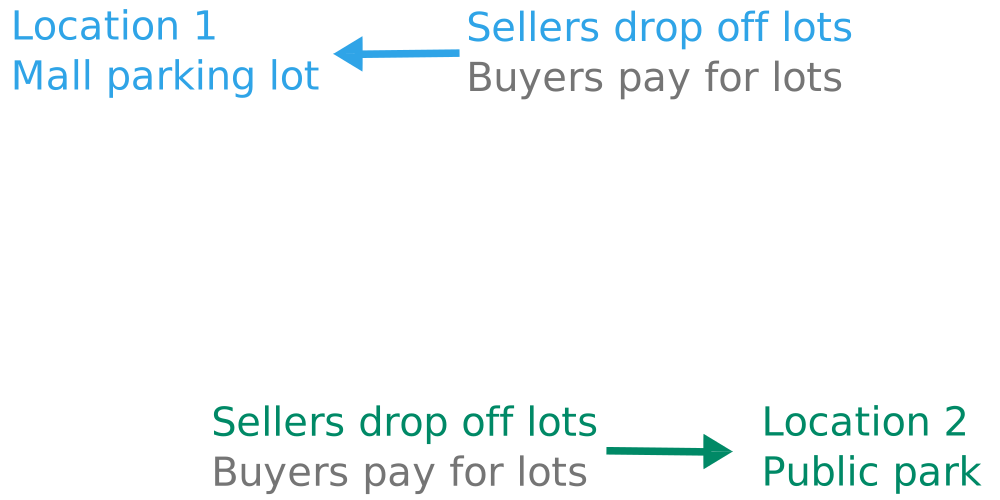
Morning: sellers drop off, at every location.
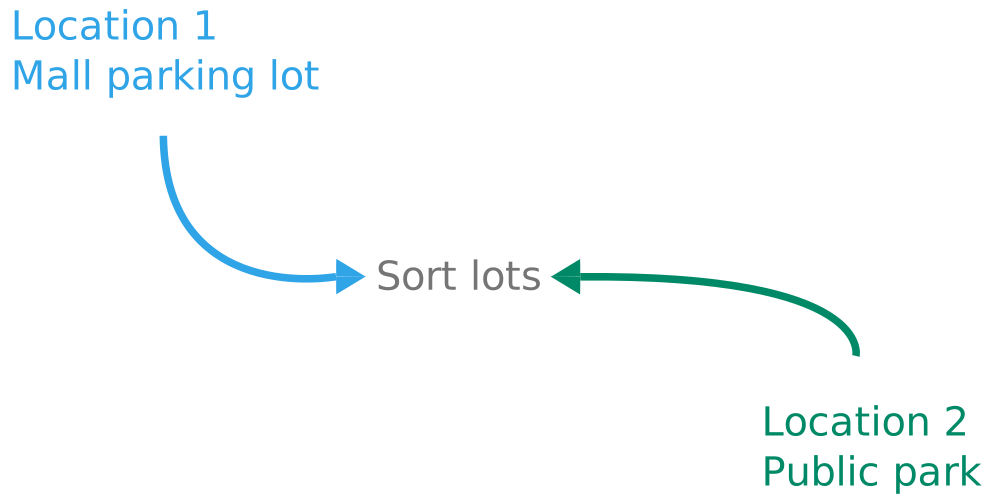
Midday: the club sorts the lots by where they're going.
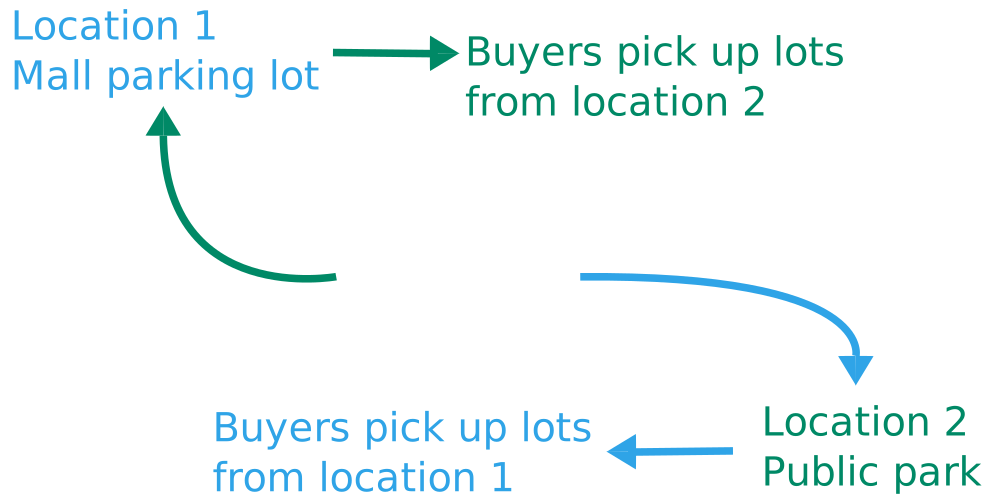
Afternoon: you pick up lots from the other locations at yours.
Two times on your invoice? The first is for lots from sellers at your own location, the second for lots from the others.
If you sold lots
- Label each bag: lot number, winner, and where it's going. Print labels for your lots on your invoice does it. No printer? Sharpie. Lot labels has more.
- Bag them properly. Bagging fish has the details.
- Bring them to your location at the first pickup time, in a cooler.
The club pays you after pickup, usually by check to the address on your account, within a week or two.
When something's wrong with a lot
Dead on arrival, short, not as described, or it never turned up: tell the people running the auction, not the seller. Reply to any email you got about the auction, or use the Email button on the auction page. Send the lot number.
They'll refund some or all of it through the invoices. It comes off the seller's payment, and the club gives up its cut too.
After the auction, Feedback (in the menu under your name) lists the lots you bought and sold in the last three months. Rate each one +1 or −1, or leave it, and add a comment. Sellers rate buyers too. 3% of buyers here rate anything, and 95% of the ratings are +1.
Want to reach a seller about a lot you missed? Search Lots with Open/ended picked and ask in the lot's chat. Some sellers show their email on their user page.
 Website copyright 2020-2026